
Aieos
-
Posts
1,538 -
Joined
-
Last visited
Everything posted by Aieos
-
Interesting, I'll be building something on my house today actually using stairs like that, I'll experiment and find the best solution for it, and get back to you on it. Good to know that stops the rag doll animation at least.
-
Seems like the game isn't recognizing the stairs as actual ground, causing you to enter a falling animation as you near the edge of the building/platform. Maybe adding a ramp under the stairs, like in this horrible image I just made in snipping tool, might cause it to recognize it as a valid platform and not make you ragdoll. Don't really have the time to get on an experiment with it right now, but this might help.
-
Problem solved, pending archive.
-
1. Log out of the panel. 2. Click the link in the email. 3. Refresh the web page. 4. Log back into the panel. This is a common issue, and this fix works 90% of the time, give it a shot, and let us know if it still persists.
-
Oof, the deathmatching though. Immediately starts unloading on the guy. His car was on before the gun was pointed and demands were given, he could easily drive away. The shooter got off the bike and just immediately started shooting before giving demands. Arguably though, the way he decided to drive away could have been better. Could have gotten out of there a lot faster instead of backing up so far just to impact the shooter with greater force.
-
This^ /carrybody does indeed not have any vertical restrictions, placing the patient near the edge and RP'ing that a basket carries them down and going safely below them and using /carrybody will cause them to be teleported into your arms. I assume this is what was meant to be done, as I cant imaging carrying a body would make your character immune to damage, as this would be used as an exploit for sure.
-
I'm confused, you want to be immune to fall damage while using /carrybody? Realistically falling off a building while carrying somebody, you would still be injured from it. Maybe I'm just seeing your situation wrong.
-
Had a fun interaction with these guys at the farm when they unknowingly tried to steal my Neon. Hope to see more of you out there, you seem entertaining. Good luck.
-

Cruzio - Cruzio Stax (Clientside Packages checksums mismatch! Trying again..)
Aieos replied to Cruzio Stax's topic in Archive
@Cruzio Stax Try deleting your client_resources folder. This is located in your Rage Multiplayer directory. After doing this, disable your firewall/antivirus, then connect to the server, this is to make sure they are not blocking any of the files from downloading. Let us know if this helps! -
click the link, refresh the page, sign into the panel. http://panel.eclipse-rp.net/ it should let you though if you mess with it, I'm not sure the exact steps, but that might work.
-
+1. Make my number even bigger.
-
Would anybody even want to disagree with this? +1
-
@DIDDLEMETHIS @Thomas_Shelby @videogamecop @Toasty @Jonny Test The issue has been resolved now. Pending Archive.
-
He was knocked down on his screen too, it just looked weird from the desync
-
Hello! Thank you for posting this. Remember to follow the bug appeal format posted here! On to the actual content of the post. I'm not sure if I understand what you're wanting out of this? You did some stuff, got caught and went to jail for it. The cop not being hit is due to desync, on his screen, he wan't in the same spot as your screen, so he moved a bit, but as it looks, he was still knocked down anyway, just not enough to kill him.
-
This issue has been delivered to higher ups, and will be looked into. Please be patient, and the issue will be resolved soon. Sorry for any inconvenience this has caused.
-
After attempting to log into http://panel.eclipse-rp.net/ it will send you an email verification link. Click it, maybe like 10 times, sometimes it's stubborn, it should end up working. If the link brings you to the forum instead of the panel, it's the wrong link. Make sure it's the in-game account verification email, not the forum account verification email.
-
I feel ya
-
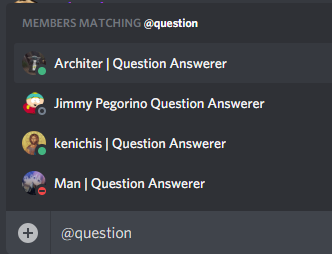
We got this name format so everybody could recognize us as people who are ready and willing to answer questions. If they want to tag somebody, I feel like the name alone should be enough, especially if they see you actively in the channel, already helping out others with their issues/concerns. If you'd like to get PM's and tagged for questions? Just answer in the channel and add the tag to your name. That's why I originally used it to begin with, so people would know they could rely on me for assistance.
-
You shouldn't have been able to pick up the bag while on the phone. But if it did and bugged out, and you lost the items. You can take the evidence of the loss, and file a refund request. Here are the requirements, and the format for such a request. Best of luck.
-
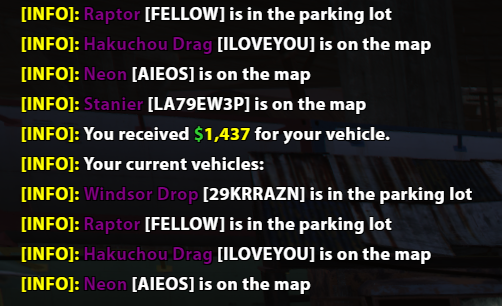
Can confirm, after having a scrapyard vehicle, drive it back to the scrapyard and press Y while in the vehicle, and use the red button to scrap it. You will get some money for it, and it'll be removed from your characters owned vehicle slots. Just tested and it works. Here's a picture for proof. The scrap vehicle was the Stanier.
-
It doesnt seem like you've donated enough for a donator role. It should automatically give it to you in discord, which it hasn't. And after it does, just go to the #donators channel and link your forum profile, asking to be given the status on the forum.
-
Please follow the proper guidelines and format before submitting a technical support post. Also if you are the bald guy, with the nasty shoes, that's just a loading screen. If the chat box is saying you failed to connect, then make sure you are connecting to the proper IP address: 51.91.16.98:22005 If it is downloading the files in the bottom right, let it finish. If you are playing as your character and cant see anybody? You are in the wrong dimension. Submit a /report 2 in-game and ask to be fixed.
-
Passenger using cellphone while driving causing crash
Aieos replied to Nick_Smokerson's topic in Archive
Also you should use the proper format before posting a bug report. -
Passenger using cellphone while driving causing crash
Aieos replied to Nick_Smokerson's topic in Archive
Other topics with similar/same issues.