
-
Posts
81 -
Joined
-
Last visited
About Mpache
-
Rank
Enthusiast

-
big +1
-
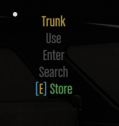
Recently a change was pushed allowing body (and carried players I believe) to be stored inside of vehicle trunks that support it via the 'Store' option on the vehicle's trunk UI. You can't currently take out a body (and a player) via the interface, but you instead have to use the /carrybody command. The proposed suggestion is to add an option in the interface to carry the body (or player) from the trunk via the UI. It would fit under the Store option neatly and could be called something along the lines of the current command - "[E] Carry Body".
-
That entire interface could use a facelift similar to how vehicle, clothing, and faction menus were updated. +1
-
The triage beds make sense for MD and people who RP with MD who are interested in better immersion versus just a pickup&go, or where a stretcher (which has wheels and is heavier) doesn't make sense for example.
-
+1, adds immersion!
-
15 x floppy paris 2023 amogus pattern stickers
-

Add Shift+Click to quick move items between inventories.
Mpache replied to Harley's topic in Implemented Suggestions
+1 -
+1
-
This exists at Pillbox and Paleto, and there is an additional one within DOC - not sure if the DOC one is special due to the location.
-
We have something in the works! For us medics, we have outfits made and in use already! As for patients, we'll be sorting out a supply shortly and then handing it to people when necessary, depending on the RP that takes place - i.e if they get hospitalized and require a longer stay, they would get a set for use temporarily.
-
With the UI refresh, your current radio frequency is always displayed without the ability to toggle it on/off. This is personally visually annoying as it is sort of in your face due to the position, but it can also easily lead to radio frequencies being metagamed in screenshots and footage (forum reports, media share, and similar). I propose two solutions: a) Removing it altogether, and the area serving as the 'talking' popup; however the feature might be useful to people who jump around frequencies, so this is probably sub-optimal. b) Providing the ability to toggle it on and off; this would provide people with a choice. Additionally, the talking prompt is there now, and it would be nice if its position and size were adjustable.
-
Big W! Implemented as of today's patch - this can be archived
-
+1
-
+1 but make it toggleable between the two
-
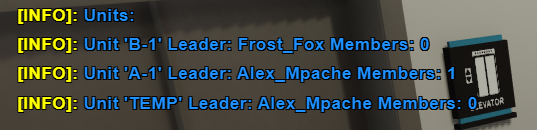
Date and time (provide timezone): Discovered 5:10 pm UTC Character name: Alex Mpache Does this issue appear again after a full game restart?: Yes, verified. Verified with Pazz (PD Faction Leader), happens with PD as well, so probably everyone. How many times did this issue appear for you? It seems to be new after the recent changes, I reproduced it via game restart and an F1 server reconnect. Issue/bug you are reporting: Faction units bug out upon F1 reconnect, C0 and game reload. You don't automatically rejoin the unit you were in, even if you are the sole member and its creator, you are forced to /joinunit. This causes the member count of the unit in /units go to up by 1 every time you join it. If you /joinunit back into your unit, you won't be assigned as the leader and, therefore won't be able to disband or rename it. Additionally, you can create a new unit, and then you have the old one in your name and the new one in your name. Clearing it with /clearunit is possible, but the command isn't something accessible to non-supervisory (for MD it's Supervisory, but unsure about other Factions). Expected behavior: You automatically rejoin your unit once you come back, and as the leader if you were the leader previously. Evidence, notes worth mentioning, steps to replicate: